There is a particular kind of digital clutter that feels uniquely modern: the smartphone photo library. Most people carry tens of thousands of images — blurry duplicates, forgotten screenshots, five nearly identical shots of the same sunset — organized by nothing more than the date they were taken. Google Photos has chipped away at this problem for a decade with search, face recognition, and auto-albums. But on September 3, 2026, Google made the biggest leap yet: Gemini Spark can now manage your entire Google Photos library autonomously, running complex multi-step workflows in the background without you lifting a finger.
The rollout is beginning now for Google AI Pro and Ultra subscribers in the United States, with broader availability expected in the coming weeks. It represents a meaningful escalation in what consumer AI agents are being asked to do — and a test case for whether users are ready to hand control of something as personal as their photo archive to an autonomous system.
What Gemini Spark Does With Your Photos
Gemini Spark is Google’s agentic layer — the part of Gemini designed not just to answer questions but to plan and execute multi-step tasks over time, including tasks that run while you’re not present. Until now, Spark’s integrations have been spread across productivity tools: drafting emails, managing calendar events, summarizing documents. The Google Photos integration adds something more intimate.
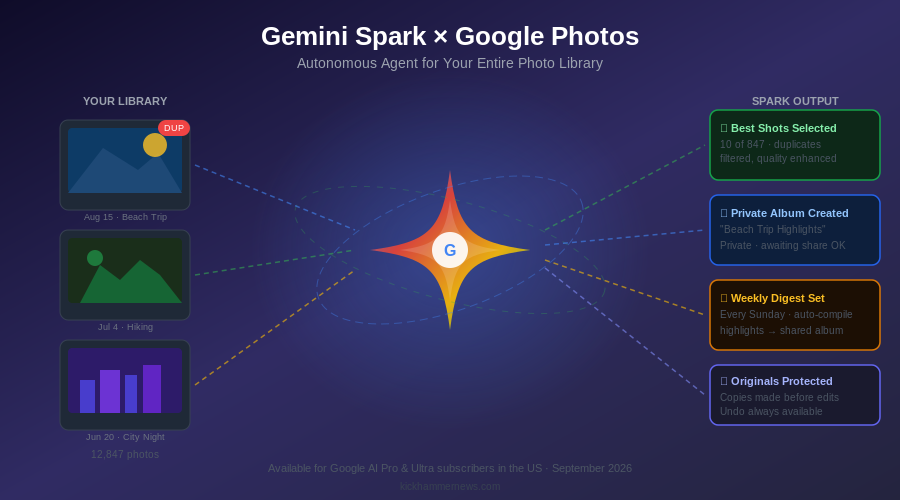
With Spark connected to Photos, you can ask it to do things that would previously have required hours of manual effort. Search your entire library for the best photos from your daughter’s birthday parties, filter out the blurry ones, enhance the top ten, compile them into a private album, and send the album link to your family — all from a single natural-language request. Spark plans the steps, executes them in sequence, and reports back when it’s done.
More significantly, Spark can run these workflows on a schedule. You can ask it to compile weekly photo highlights into a shared album every Sunday, or to automatically move all screenshots to a separate folder on the first of each month, or to flag photos that include an important person and surface them for your review. These are the kinds of tasks that feel minor individually but accumulate into a meaningful burden over time — and that most people simply never do because the friction is too high.
The Specific Capabilities
Google has been explicit about which Photo actions Spark can currently perform. The list includes: searching for photos and videos by subject, location, date, or event; identifying the best shots from a burst or series by filtering near-duplicates; enhancing photo quality and applying quick fixes; generating collages and stylized images; creating new shared or private albums; sharing album links through Gmail or Google Messages; and building calendar appointments from event flyers or invitations captured in photos.
One detail worth noting: Spark can also cross-reference your calendar before sending invitations or scheduling-related actions, checking for conflicts before committing. This kind of integration across Google’s product surface — Photos, Gmail, Calendar, Messages — is exactly what makes the Gemini Spark approach different from a standalone photo editing tool. It has context that spans your digital life, which makes its actions more useful and its mistakes more consequential.
Privacy Architecture and Safety Guardrails
Google has built several guardrails into the Photos integration that are worth examining carefully, because they tell you something about how the company is thinking about the risk profile of autonomous agents operating on personal data.
Before editing any image, Gemini Spark creates a copy of the original. The edit is applied to the copy; the original is preserved. This is non-trivial: it means a Spark-generated enhancement can be compared against and reverted to the source without data loss. For a family photo archive spanning decades, this matters.
New albums created by Spark are private by default. The agent will not share an album or send an email on your behalf without explicit permission — meaning it will surface the action and ask before executing it. This is a meaningful constraint on what “autonomous” means in practice. Spark can plan and prepare, but it will not act across external communication channels without a human checkpoint.
The data used by Spark within Photos stays within Google’s ecosystem. Third-party access to the raw library is not part of this integration — Spark is acting on your behalf within Google’s own product surface, not exposing your library to external APIs or services. That said, users should read Google’s updated terms of service carefully. Using an AI agent to process and restructure a photo library at scale is a different kind of data relationship than searching or viewing photos manually, and the implications for how that processing data is used warrant scrutiny.
The Broader Trajectory of Personal AI Agents
The Gemini Spark Photos integration is part of a larger story about where consumer AI is heading in late 2026. We are moving from AI as answering machine — ask a question, get a response — to AI as executive assistant: something that takes on tasks, executes them over time, and delivers results. The value proposition is clear: there are entire categories of digital maintenance that most people simply neglect because the effort isn’t worth it, and AI agents change that calculus.
But the shift also introduces new kinds of risk. An autonomous agent that reorganizes your photo library according to criteria you specified but didn’t fully think through can create a mess that’s hard to undo — even with copies preserved. An agent that shares an album before you’ve reviewed its contents can expose images you didn’t intend to share. The history of software automation is full of cases where “it does exactly what you asked” turned out to be different from “it did what you wanted.”
Google’s answer to this risk is the combination of reversibility (copies before edits), privacy-preserving defaults (private albums, permission gates on sharing), and gradual rollout (US only, premium subscribers first). Whether those guardrails are sufficient will become clearer as more users interact with the feature and edge cases surface.
What This Means for Competitors
The Photos integration raises the stakes for Apple, Amazon, and any other company with a photo storage product and an AI strategy. Apple’s Photos app has strong on-device AI for search and memories, but its agentic capabilities — through Siri and Apple Intelligence — have lagged behind Google’s in terms of multi-step task execution. Amazon’s Photos product has never seriously competed on AI features. For anyone who stores their life in Google Photos and uses Google AI Pro or Ultra, Gemini Spark just became significantly harder to ignore.
The immediate question is whether the feature works as described in real-world use — with messy, imperfect photo libraries full of unusual subjects, low-quality scans of old prints, and screenshots mixed in with genuine photography. Lab demos and controlled tests rarely capture the full complexity of a real user’s archive. The beta users currently testing the integration will be the first signal of whether Spark’s photo capabilities hold up under real conditions.
For now, the announcement marks a clear inflection point: AI agents are no longer just managing your calendar and summarizing your email. They’re being handed the keys to the parts of your digital life that are most personal, most chaotic, and most in need of organization. How that goes will shape the next chapter of consumer AI.
Sources: 9to5Google | TechCrunch | Droid Life | AndroidPure