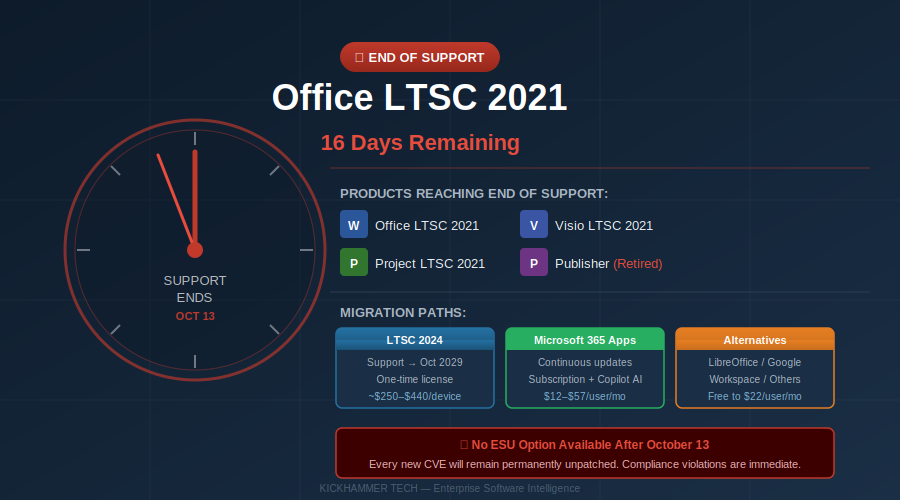
The calendar is counting down to October 13, 2026 — and for the tens of thousands of organizations still running Office LTSC 2021, Visio LTSC 2021, or Project LTSC 2021, that date is a hard wall with no cushion on the other side. Microsoft has made it unambiguously clear: when support ends, it ends completely. No Extended Security Updates (ESU) program. No paid grace period. No last-minute reprieve.
If your enterprise hasn’t started its migration, you have sixteen days. And if you’ve started but haven’t finished, the stakes just got very real.
What’s Going Out of Support
October 13, 2026 marks the simultaneous end of mainstream and extended support for an entire family of Microsoft perpetual-license software:
– Office LTSC 2021 (Standard and Professional Plus editions)
– Office 2021 (consumer Home & Student and Home & Business editions)
– Visio LTSC 2021 (Standard and Professional)
– Project LTSC 2021 (Standard and Professional)
– Microsoft Publisher — not just going out of support but being retired entirely, ending a 35-year run
That last item deserves a moment of pause. Publisher isn’t being superseded by an LTSC 2024 version. It’s simply gone. Organizations that rely on Publisher for template-based print workflows, newsletters, or branded materials will need to find an alternative — Microsoft suggests migrating to Word, PowerPoint, or its online Canva-adjacent Designer tool.
Why This Is Different From Every Other End-of-Support Date
Microsoft’s end-of-support deadlines typically come with a fallback: Extended Security Updates. Windows 7 had them. Windows 10 had them. SQL Server 2014 had them. They’re never cheap — typically $30 to $75 per device annually — but they buy time. Office LTSC 2021 offers no such lifeline.
Microsoft made this decision for a strategic reason: Office LTSC 2024 already exists as the natural upgrade path for organizations that need perpetual licensing. If you want to stay on a fixed-license model, LTSC 2024 extends your runway to October 2029. But if your organization is still running LTSC 2021 software today, you will not be able to simply write a check and keep using it securely.
After October 13, every vulnerability discovered in Office LTSC 2021 will remain permanently unpatched. The CVE will be published. Proof-of-concept exploits will eventually appear on GitHub. But the fix never will.
The Compliance Cliff Is Steeper Than You Think
For organizations operating in regulated environments, the calculus is particularly harsh. Running unsupported software is not a gray area under most compliance frameworks:
– PCI DSS 4.0 requires that all software components receive security updates; unsupported software constitutes a control failure
– HIPAA mandates “reasonable and appropriate” safeguards — running unpatched software with known CVEs is difficult to defend before an auditor
– SOC 2 Type II auditors scrutinize vulnerability management processes; unsupported Office versions will appear as findings
– ISO 27001:2022 requires organizations to maintain inventory of software assets and manage vulnerabilities — gaps here can derail certification renewals
Compliance failures rarely happen on October 14. They surface months later, during audits, after breaches, or when cyber insurers discover unsupported software during underwriting reviews. The consequences can be severe: policy voidance, premium increases, failed renewals, or breach notification requirements that wouldn’t have applied had software been patched.
The 2026 End-of-Support Convergence
What makes October 2026 uniquely difficult for enterprise IT is that Office LTSC 2021 is not the only deadline hitting this year. The second half of 2026 is an extraordinary convergence of Microsoft product retirements:
– Exchange Server 2016 and 2019 — end of support October 14, 2025 (already expired for most)
– SharePoint Server 2016 and 2019 — end of mainstream support already elapsed
– Windows Server 2022 — approaching its own lifecycle milestones
– Office LTSC 2021 — October 13, 2026
– Windows 10 Extended Security Updates (Year 1) — expiring October 2026
IT departments that were already stretched thin managing the Windows 10 ESU countdown are now discovering they also need to address an entire Office suite simultaneously. The teams most at risk are mid-market organizations — the 200- to 2,000-seat shops that cannot afford dedicated lifecycle management staff but also cannot simply absorb the operational risk of running unsupported productivity software.
Three Paths Forward
For organizations that haven’t yet made the move, the decision framework is relatively clear.
Path 1: Microsoft 365 Apps
The subscription model Microsoft most actively promotes is Microsoft 365 Apps — the cloud-connected version of Office that receives perpetual monthly updates and never hits an end-of-support wall the same way a fixed release does. For organizations already using Microsoft 365 for email and Teams, this is typically the path of least resistance. Licensing runs from approximately $12 per user per month on the Business Basic tier to $57 per user per month on the enterprise E5 plan, depending on the services bundle needed.
The upside: organizations get access to AI-powered Copilot features, which have been a significant value proposition throughout 2026. The downside: Microsoft 365 Apps require persistent internet connectivity for license validation and evolving feature updates that some organizations — particularly in regulated or air-gapped environments — find incompatible with their change management processes.
Path 2: Office LTSC 2024
For organizations that genuinely cannot operate on a subscription model — government agencies with perpetual licensing mandates, defense contractors with air-gapped networks, educational institutions with specific procurement requirements — Office LTSC 2024 is the right answer. It extends support to October 2029 and delivers a one-time purchase at approximately $250 to $440 per device.
LTSC 2024 does not include Copilot AI features or cloud-dependent services, but it does include meaningful productivity improvements over LTSC 2021, including enhanced accessibility features, improved performance on ARM architecture, and updated collaboration workflows.
Path 3: Alternative Productivity Suites
A meaningful minority of organizations — particularly those with low macro dependencies and aversion to vendor lock-in — are taking the opportunity to move off Microsoft Office entirely. Google Workspace has gained significant traction in the SMB sector, running $6 to $22 per user per month. LibreOffice, the open-source office suite, has seen renewed interest, particularly among European public-sector organizations following Germany’s federal Linux and ODF mandate issued in September 2026.
The caveat is that compatibility is never perfect. Organizations running complex Excel models with VBA macros, intricate Word mail merges, or Project timelines with enterprise resource management integration will face conversion challenges that require careful audit before committing to an alternative suite.
What to Do in the Next 16 Days
For organizations still on Office LTSC 2021, the window for an orderly migration has essentially closed. That doesn’t mean the options have disappeared — but it does mean the acceptable risk calculus has changed.
Immediate actions:
First, complete an accurate audit of your Office LTSC 2021 footprint. Asset management tools like Microsoft Endpoint Configuration Manager, Intune, or third-party solutions like Flexera can identify every installation. Don’t rely on your software inventory from two years ago — shadow IT installs and untracked devices are common.
Second, triage your systems by risk profile. Workstations handling sensitive data, internet-connected machines, and systems used for financial or healthcare transactions should be prioritized for immediate remediation. Air-gapped development or testing systems may tolerate a slightly longer migration window — but only with compensating controls documented and acknowledged by your security team.
Third, if you cannot complete migration before October 13, document the gap formally. A written risk acceptance signed by appropriate leadership, with a target remediation date and interim compensating controls, is the difference between a managed risk and an unmanaged one when an auditor eventually asks why unsupported software appeared on your network.
Finally, engage your Microsoft partner now. With the deadline imminent, provisioning and deployment queues for Microsoft 365 Apps can be surprisingly long, particularly for organizations requiring custom configuration, DLP policy migration, and user training.
A Final Word on Publisher
Publisher’s complete retirement deserves more attention than it’s received. Microsoft Publisher has been a quiet workhorse for small businesses, churches, schools, community organizations, and marketing departments for three and a half decades. The templates and institutional knowledge embedded in Publisher files have accumulated for years.
If your organization has Publisher files — and there are more of them than most IT directors realize, squirreled away in departmental shared drives — now is the time to inventory and convert them. Publisher’s own built-in export to PDF and Word remains functional through October 13. After that, the best option is Microsoft’s online format converter tools or third-party conversion utilities. Leaving it until after support ends means losing even that rudimentary safety net.
The October 13 deadline for Office LTSC 2021 will not receive the breathless news coverage that Windows 10’s end-of-support generated. But for the IT professionals responsible for keeping organizations secure, compliant, and operational, it may be just as consequential. The countdown clock is visible from here.
This article is published by KickHammer Tech, covering enterprise software, cloud platforms, and infrastructure.


