October 4, 2026
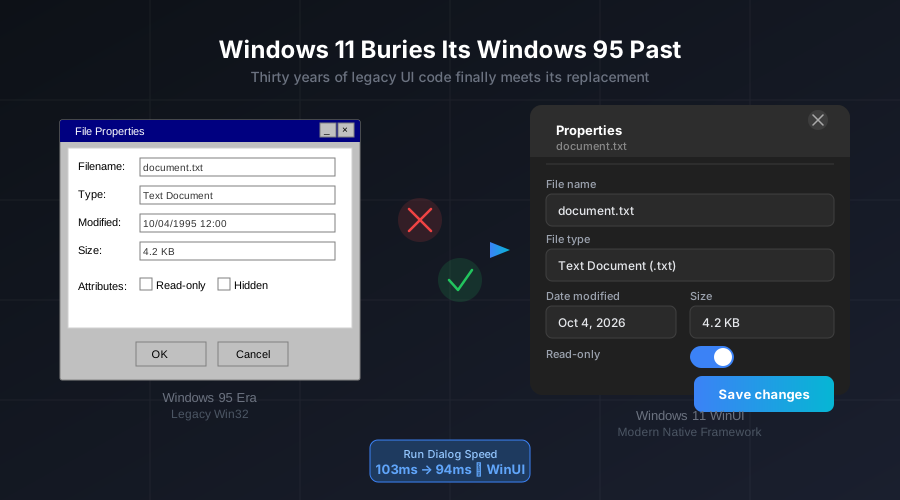
Somewhere in the codebase of Windows 11, until very recently, lived a dialog box born in 1995. The File Properties window—that humble panel you’d summon with a right-click—carried the same visual DNA as a desktop OS launched before most of today’s PC users finished elementary school. It didn’t support dark mode. It didn’t understand modern display scaling. And it loaded with the unhurried indifference of a piece of software that had never needed to be fast, because nothing faster had come along to embarrass it.
That dialog is now gone, replaced by a native WinUI rebuild. And it’s far from the only casualty in Microsoft’s increasingly determined effort to finally bury the Windows 95 era.
Thirty Years Is a Long Time to Carry Technical Debt
The legacy code problem in Windows is not a secret. Microsoft has been discussing the challenge publicly for years, acknowledging that the operating system carries an extraordinary weight of interfaces, dialogs, and controls that were engineered before modern rendering frameworks existed. The problem isn’t just aesthetic—it’s architectural. Legacy Win32 components can’t participate in Windows’ newer animation systems, don’t respond well to high-DPI displays, and in many cases consume more memory than their WinUI equivalents.
The shift began accelerating in earnest in 2025, and by mid-2026 it had become unmistakably systematic. March Rogers, Microsoft’s Partner Director of Design, confirmed as much: “The file properties dialog was rebuilt in WinUI3. Our plan is to bring more of the Windows UI to WinUI3.”
The company subsequently dropped the “3” from the branding, simply calling it WinUI—a signal, according to Microsoft’s own messaging, that this is not another transitional framework to be abandoned in three years. Given that Windows developers have watched Microsoft cycle through Win32, WPF, Silverlight, WinRT, UWP, and web-based wrappers over the past two decades, the implicit promise matters as much as the technology itself.
What’s Actually Changing
The list of components being modernized is longer than most users realize. The Run dialog—the small launcher most power users summon with Win+R dozens of times a day—has already been replaced with a WinUI version. Benchmarks show it opening in 94 milliseconds versus the 103 milliseconds of its predecessor, a modest but symbolically significant improvement. This is one of the most frequently used elements in Windows. That it loaded from 1995-era code until 2026 says everything about the depth of the technical debt Microsoft is finally confronting.
Other components in various stages of migration include:
- Print Management: Transitioning from an old Microsoft Management Console snap-in to a standalone WinUI application
- AutoPlay: Getting its first real visual overhaul since Windows 8, with a new interface that integrates properly with modern Windows design language
- The common file Open/Save dialog: Listed as next in the migration queue after the Properties dialog
- The “Switch to local account” workflow: A Windows 8-era flow that will receive a WinUI rebuild
- Mouse pointer animations: Smoother cursor behavior is under testing in Insider builds
More consequentially, Microsoft is also working toward a WinUI-based Start menu. The current Start menu runs on React Native—a web-adjacent technology that Microsoft adopted under pressure when native frameworks weren’t ready. The company has been cautious about the timeline here, citing unresolved issues with WinUI’s memory efficiency and a visual artifact where windows tear slightly during resize operations. But the direction is confirmed.
Why This Matters Beyond Cosmetics
The temptation is to view the WinUI migration as a cosmetic exercise—swapping old-looking dialogs for ones that match the rest of Windows 11’s Fluent Design aesthetic. But the performance data tells a more interesting story.
The most significant opportunity identified by Microsoft’s own engineers isn’t in replacing old dialog boxes. It’s in replacing the WebView2 and web-based Windows components that currently power several features—components like the Settings app, portions of the Start menu, and various inbox applications—with native WinUI equivalents. Web-rendered components in a native OS shell introduce real overhead: separate rendering pipelines, larger memory footprints, and slower response to system-level events like theme changes and power state shifts.
The Run dialog’s 9-millisecond improvement is almost imperceptible to a human, but it reflects what happens when a component is no longer fighting the overhead of a 30-year-old subsystem. Extrapolate that pattern across dozens of components, and the cumulative effect on perceived responsiveness could be substantial.
Microsoft has been public about this goal. In August 2026, the company stated explicitly that Windows 11 “needs to be faster,” and confirmed that reducing web-rendered UI components was part of how it planned to get there.
The October 7 Backdrop
The timing of these UI updates isn’t coincidental. Microsoft has confirmed an event for October 7 in San Francisco—the company’s first major Windows-focused event in nearly two years. The event will feature NVIDIA CEO Jensen Huang and is expected to center on new Surface hardware, the RTX Spark neural processing architecture, and what Microsoft is calling local AI: on-device inference capabilities that run without cloud connectivity.
The WinUI migration effort fits naturally into this narrative. If Windows is to become a platform for local AI workloads—with dedicated NPU scheduling, Microsoft Execution Containers for secure AI agent sandboxing, and native integration with hardware like RTX Spark—the underlying OS framework needs to be modern enough to support those capabilities cleanly. A UI layer built on a patchwork of 1995-era Win32, Windows 8-era WPF, and web wrappers is not a solid foundation for the next decade of computing.
A Bet on Trust
There is an element of trust involved in Microsoft’s pivot to WinUI that the company appears to understand. Windows developers have been burned before by framework commitments that evaporated. The decision to strip the version number from WinUI—making it simply “WinUI” rather than “WinUI 3″—reads as an attempt to signal permanence rather than iteration. The real test will come over the next two to three years, as the framework absorbs the Start menu, Settings, and the file Open/Save dialogs that are central to the Windows experience.
For users, the practical takeaway is that Windows 11 is becoming incrementally, measurably faster and more consistent—not through dramatic announcements, but through the quiet, grinding work of replacing 30 years of accumulated technical debt. The Windows 95 era in Windows 11 is ending. It’s taken longer than it should have. But the pace is accelerating, and the October 7 event may mark the moment when Microsoft ties all of these threads into a coherent forward-looking story about what the platform is becoming.
The dialog box from 1995 is gone. More will follow.


