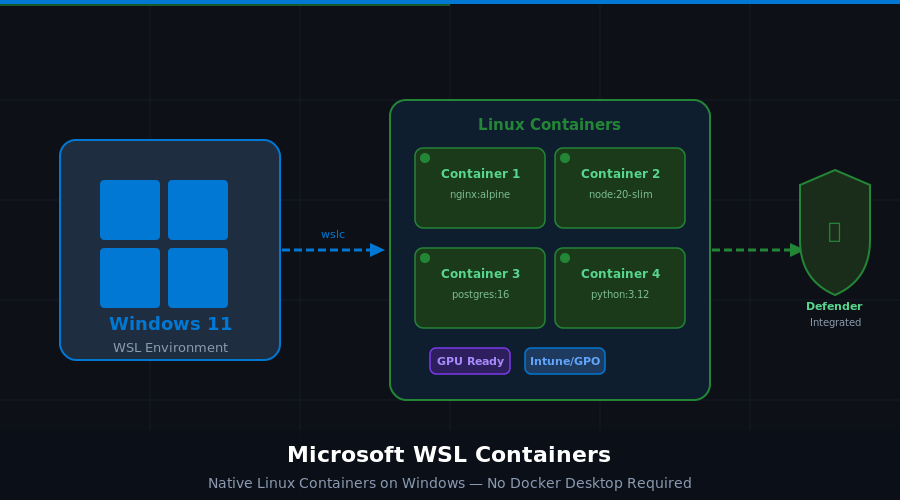
Microsoft has been quietly reshaping the way Windows developers work with Linux containers, and the implications for enterprise IT are significant. WSL Containers — the company’s built-in Linux container runtime for Windows, currently in public preview — is positioning itself as a direct challenger to Docker Desktop, with a licensing model and governance story that could tip the scales for large organizations.
What WSL Containers Actually Is
Announced at Microsoft Build 2026 and launched into public preview on June 30, WSL Containers (known by its command-line name wslc) extends the Windows Subsystem for Linux with a native container lifecycle management layer. Where WSL previously gave developers a Linux environment running alongside Windows, WSL Containers adds the ability to pull, run, and manage container images directly from that same environment — without installing any third-party runtime.
The feature ships as two components: wslc.exe, a command-line tool that feels familiar to anyone who has used Docker CLI, and a Windows API that allows applications to programmatically spin up containers as part of their own logic. GPU support is available from day one, which caught the attention of developers running AI and ML workloads who have historically had to jump through hoops to get GPU passthrough working in containerized environments.
At its core, WSL Containers is Microsoft’s answer to a question enterprise developers have been asking for years: why do I need a separate, paid product to run Linux containers on Windows? The answer, until now, was “because Windows doesn’t do it natively.” That is changing.
The Docker Desktop Problem It Solves
Docker Desktop has dominated Windows-based container development for years, but the product’s licensing overhaul in 2022 — which required paid subscriptions for enterprise users — created lasting resentment among developers and IT procurement teams alike. Even as Docker introduced more flexible tier options in subsequent years, the question of licensing compliance and cost at scale remained a friction point.
WSL Containers sidesteps this entirely. Because it is built into Windows and distributed through the WSL update mechanism, there is no separate licensing conversation. For organizations already on Windows 11 and using WSL, the feature is simply there — enabled with a feature flag and managed through existing IT infrastructure.
Hands-on testing from early preview users has been largely positive on the fundamentals. Basic container lifecycle commands — pull, run, exec, stop, remove — work as expected. Memory management appears improved compared to Docker Desktop’s VM-based approach, which has historically been a source of complaints about bloat and resource overhead on developer laptops.
That said, the preview still has gaps. Docker Compose is not yet supported, which is a significant limitation for teams that orchestrate multi-container development environments. Dev containers, a popular approach for reproducible development environments inside VS Code and Visual Studio, work in many scenarios but not all. Repositories mounted from inside the WSL filesystem behave differently than those on the Windows filesystem. And .NET Aspire integration — relevant for teams building cloud-native .NET applications — is not yet wired up. Microsoft has acknowledged these gaps and says general availability, targeting fall 2026, will close them.
Why Enterprise IT Should Pay Attention Now
The governance story is where WSL Containers separates itself most clearly from Docker Desktop, and it is the reason enterprise IT teams should be evaluating this now rather than waiting for GA.
Microsoft has built WSL Containers with Windows-native management in mind from the start. IT administrators can restrict which image registries are allowed through registry allowlists, preventing developers from pulling arbitrary images from the public internet — a common security concern in regulated industries. The feature can be enabled or disabled via MDM (Mobile Device Management) policies or Group Policy Objects, meaning it slots into existing Intune and endpoint management workflows without requiring new tooling.
Defender for Endpoint integration means that containers running on developer machines are visible to security operations teams using the same dashboards and alert pipelines they already use for Windows processes. This is a meaningful step up from the visibility gap that has plagued Docker Desktop deployments, where containers could run with limited insight from enterprise security tooling.
For organizations subject to compliance requirements — healthcare, finance, government contracting — this level of auditability and control is not a nice-to-have. It is often a prerequisite for allowing containerized development at all.
What the Competition Looks Like
Docker Desktop is the obvious incumbent, but it is not the only alternative WSL Containers is displacing. Rancher Desktop, Podman Desktop, and Lima have all carved out niches among developers who want Docker-compatible tooling without the Docker Desktop license. Each has its own tradeoffs, and each has attracted users largely because of Docker Desktop’s pricing changes.
WSL Containers is not attempting to clone Docker feature-for-feature, at least not in this initial release. The wslc CLI differs from Docker CLI in some areas, and Docker Compose compatibility remains absent. But Microsoft’s bet is that for a large segment of Windows developers — particularly those in enterprise settings who use containers for testing and development rather than local orchestration of complex multi-service applications — the built-in, managed, governance-ready option will be compelling enough.
The comparison that keeps coming up in developer community discussions is memory management. Docker Desktop’s VM-based architecture has long been criticized for consuming disproportionate RAM, particularly on Windows where the Hyper-V overhead compounds the issue. Early users of WSL Containers report a lighter footprint, though with the caveat that the comparison is not entirely apples-to-apples given the feature gaps.
The Road to General Availability
Microsoft has committed to fall 2026 for general availability, which implies a window of roughly October through December of this year. The preview is accessible through the pre-release build of WSL (build 2.9.3 or later), and Microsoft has encouraged developers and IT teams to test it now so that feedback can shape the GA release.
The items on the known gaps list — Docker Compose, Dev Containers parity, .NET Aspire, Windows filesystem mount behavior — are all on the roadmap. The pace of preview updates since launch has been reasonably fast, suggesting Microsoft is treating this as a priority rather than a side project.
For enterprise IT teams, the practical action item is to start a limited evaluation now. Identify a subset of developer machines, enable WSL Containers, and run typical workflows against it. The gaps are real, but so is the governance advantage. Knowing where the product stands before it reaches GA means IT teams can have a deployment plan ready rather than scrambling when the stable release drops.
The Bigger Picture
WSL Containers is part of a broader pattern in Microsoft’s Linux strategy that has been building for nearly a decade. From WSL 1 to WSL 2, from Azure Linux to making Linux a first-class citizen in enterprise tooling, Microsoft has steadily reduced the friction between Windows and Linux-native workloads. WSL Containers is not a dramatic break from that trajectory — it is its natural continuation.
What makes this moment notable is that Microsoft is no longer just making Linux accessible on Windows. It is making Linux container infrastructure governable on Windows, which is a materially different value proposition. For enterprise IT, governability is often the deciding factor between a technology the security team approves and one that gets blocked.
Whether WSL Containers ultimately supplants Docker Desktop for the majority of enterprise Windows developers depends on execution between now and GA. The foundation is there. The enterprise governance story is compelling. The remaining question is whether Microsoft delivers the feature parity developers need before the momentum of the preview cools. If history is any guide, Microsoft’s execution on WSL has been better than most expected. IT teams have good reason to watch this one closely.


