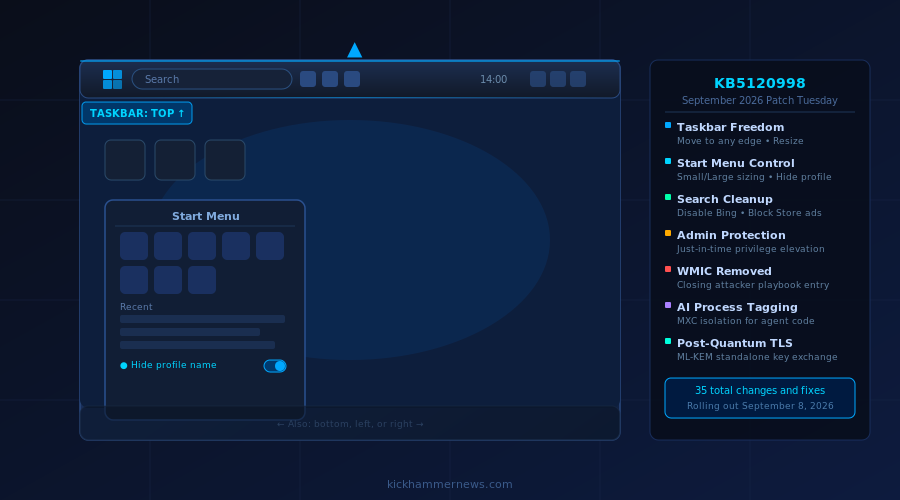
Today, September 8, 2026, Microsoft is rolling out the Windows 11 September 2026 Patch Tuesday update — officially designated KB5120998 (builds 26200.9278 and 26100.9278 for versions 25H2 and 24H2 respectively). It is among the most consequential monthly updates in recent memory, addressing a litany of long-standing user complaints about Windows 11’s locked-down interface while also quietly planting the seeds of a new AI-aware operating system layer underneath.
The update began its journey in the Release Preview Channel in mid-August, moved to the Stable Channel as an optional install on August 27, and finalizes today as the mandatory September security rollout. Here is everything you need to know.
The Taskbar Gets Its Freedom Back
For more than five years, the Windows 11 taskbar has been the most-complained-about element of the operating system. Microsoft locked it to the bottom of the screen, removed the ability to resize it, and stripped out the multi-position flexibility that Windows 10 users took for granted. With KB5120998, that era is over.
Starting today, users can move the taskbar to any edge of the screen — bottom, top, left, or right. Tooltips, flyouts, animations, and the vast majority of customization options work in all four positions. Microsoft is also introducing a smaller taskbar option for users who want to reclaim vertical screen space, reducing both icon size and bar height while keeping Start, Search, and the system tray fully accessible.
The setting lives under Settings > Personalization > Taskbar > Taskbar behaviors > Taskbar position, and the Taskbar behaviors section has been expanded by default so users can actually find it. Microsoft also fixed a longstanding reliability issue with the system tray on non-touch devices.
This is not a minor quality-of-life improvement. The taskbar’s inflexibility was a genuine barrier to adoption for power users migrating from Windows 10, Linux desktops like KDE and GNOME, and macOS. The fact that Microsoft took until 2026 to restore options that existed in Windows 7 will not be forgotten — but the restoration itself is welcome.
The Start Menu Finally Grows Up
The Start menu gets an equally significant overhaul. Users can now select Small, Large, or Automatic sizing under Settings > Personalization > Start > Start menu size, bringing granular control to an element that previously resized itself on Microsoft’s terms alone.
The “Recommended” section is being renamed “Recent,” which is more descriptive of what it actually shows. Microsoft has also added independent toggles for the Pinned, Recent, and All sections in Start settings, so users can show or hide each component independently rather than toggling the section as an all-or-nothing choice.
Perhaps the most privacy-conscious addition: a new option to hide your name and profile picture from the Start menu, ideal for presenters, classroom instructors, and anyone who shares their screen in professional settings.
Windows Search Cleans House
Windows Search has long frustrated users with a home interface crowded by Bing web results and Microsoft Store suggestions that feel more like advertising than search. KB5120998 addresses this directly.
The home interface is redesigned to reduce clutter and make recent local searches easier to revisit. Search results now more clearly identify their source — whether a local file, an app, a setting, a web result, or a Microsoft Store listing. Critically, a new setting under Settings > Privacy & security > Search lets users disable Bing web results and Store suggestions entirely, keeping Search focused on the local machine.
Windows will also begin automatically indexing the user’s most-used folders so their contents surface faster in future queries. This behavior is controllable under Settings > Privacy & security > Search > Automatically find additional relevant locations.
Administrator Protection Begins Its Rollout
One of the more significant security changes in this update is the start of Administrator Protection, a feature Microsoft first disclosed in October 2025 but is only now beginning to ship broadly.
Administrator Protection reduces the blast radius of privilege escalation attacks by implementing just-in-time elevation — administrator rights are granted for specific tasks and then removed, rather than remaining perpetually available. It introduces profile separation to harden the system against malicious elevation attempts.
It is disabled by default in this rollout and must be enabled via Microsoft Intune using OMA-URI or Group Policy. Microsoft explicitly notes that Administrator Protection is not a formal security boundary, but it meaningfully narrows the attack surface for a common class of exploits that ransomware operators and advanced persistent threat actors routinely abuse.
WMIC Is Gone, and That Is a Good Thing for Security
Beginning with the September 2026 update, the Windows Management Instrumentation Command-line (WMIC) utility is removed from Windows 11 versions 24H2 and 25H2. WMIC had already been removed from new installations and stripped from Feature on Demand availability; this update completes the deprecation for existing installs.
WMIC has been a persistent tool in attacker playbooks for well over a decade. Threat actors use it for lateral movement, reconnaissance, and persistence because it provides powerful system interrogation capabilities while leaving minimal log traces. Its removal does not break Windows Management Instrumentation itself — WMI remains fully supported, and scripts that rely on WMI APIs continue to function. Only the legacy WMIC command-line wrapper is gone.
The Quiet Revolution: AI and Post-Quantum Features
Beyond the headline UI changes, KB5120998 contains two features that hint at where Windows is heading architecturally.
Agentic process tagging introduces platform-level support for marking processes as AI agents. Authorized components can assign an opaque agent identifier to a process token; the operating system automatically inherits that tag into child processes. When an agent authenticates through Web Account Manager, the agent identifier from the process token is included in the authentication request. This creates an identity trail for agentic workflows within the OS security model — useful for enterprises auditing AI activity on managed devices.
Microsoft Execution Containers (MXC) now support Process Isolation, described by Microsoft as “a fast, lightweight boundary designed for responsive workloads such as coding agents and model-generated code.” This is a meaningful signal: Microsoft is building native, lightweight sandboxing infrastructure specifically for AI-generated code execution, distinguishing it from the heavier isolation of traditional virtual machines or Hyper-V containers.
Meanwhile, ML-KEM post-quantum cryptography can now function as a standalone algorithm for TLS key exchange, not just as the hybrid-group companion it was introduced as previously. As quantum computing timelines firm up among nation-state adversaries, the steady hardening of Windows TLS is exactly the kind of quiet infrastructure investment that matters over the long run.
Other Changes Worth Noting
The September update includes 35 total changes and fixes beyond the headline features. File Explorer’s Home page launches faster and now supports touch scrolling. The loading spinner has been redesigned for visual consistency. Virtual desktop switching is smoother. The Get Started app gains new pages covering app installation, site pinning, and themes. Windows Autopilot device association is now generally available for enterprise enrollment workflows. Microsoft Store gains support for in-app purchases in packaged WinUI 3 apps requiring elevation.
A fix for VPN-related background issues that caused processes to stop responding will be welcome news for remote workers and IT administrators who manage VPN-heavy estates.
Bottom Line
The Windows 11 September 2026 Patch Tuesday is one of the few monthly updates that can credibly claim to change how the operating system feels to use every day. Moving the taskbar, resizing the Start menu, and silencing Bing from Search are changes that millions of users have been requesting since Windows 11 launched in 2021.
The AI-aware features — agentic process tagging, MXC isolation — will matter more to enterprise IT teams and developers than to home users today, but they represent a deliberate architectural investment in making Windows a first-class platform for running AI workloads safely. Combined with the post-quantum TLS upgrade and the Administrator Protection rollout, this update signals that Microsoft is treating security and AI infrastructure as co-equal priorities heading into the final months of 2026.
If you are on Windows 11 24H2 or 25H2, expect the update to land via Windows Update today from 1PM Eastern Time onward, with Microsoft’s typical Controlled Feature Rollout meaning some features will arrive gradually rather than all at once.


