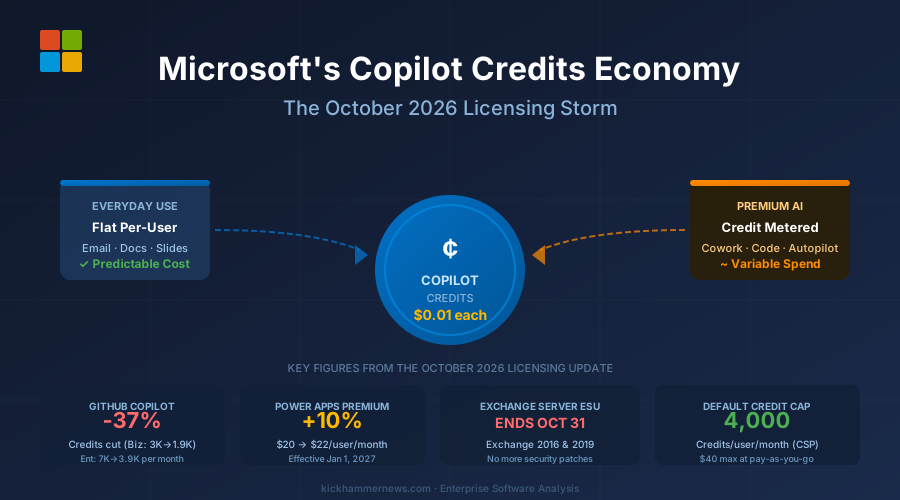
October 2026 will be remembered as the month Microsoft’s licensing model fundamentally changed. The industry spent weeks bracing for the October 13 deadline cluster — Office LTSC 2021, Windows 10 ESU Year 1, Windows Server 2012 R2 all going end-of-life simultaneously — but the more structurally significant shift is quieter: the arrival of Copilot Credits, a metered AI economy that converts premium productivity features from flat subscriptions into consumption billing. Think Azure, but for Outlook.
I want to be direct about what this actually means for budgets, because most coverage stops at listing the changes. It doesn’t. This article works through the real numbers so you can model your own exposure before the invoices arrive.
What the Credits Economy Actually Costs: Real Numbers
Microsoft set the pay-as-you-go rate at $0.01 per Copilot Credit with a default monthly cap of 4,000 credits per user for new CSP purchases. Let’s make that concrete.
A 500-seat Microsoft 365 Copilot Business organization hitting the full default cap every month would spend $40 per user per month on credits alone — $20,000 per month, or $240,000 per year — on top of whatever they’re already paying for per-user Copilot subscriptions. That number assumes every user exhausts their 4,000-credit cap, which likely won’t happen in year one. But “likely won’t happen” is not a budget. You need a range.
Prepurchase plans discount credits by 5 to 20 percent depending on volume commitment. At the 20 percent tier, that same 500-seat org spending at full cap pays $192,000 per year instead of $240,000 — a $48,000 saving that requires upfront commitment. The breakeven point between pay-as-you-go and the 20 percent prepurchase tier is roughly 3,000 credits per user per month, sustained. If your organization’s actual monthly usage is below that, pay-as-you-go is the rational choice until you have 12 months of consumption data to commit against.
For GitHub Copilot, the math runs differently. Business seats ($19/month) now include 1,900 credits instead of the promotional 3,000. Enterprise seats ($39/month) dropped from 7,000 to 3,900. The price per seat didn’t change — the included AI budget did. If your developers use Copilot Chat, agent mode, or premium models for more than roughly two hours of active AI-assisted sessions per day, you’re likely in overage territory. Code completions remain unmetered and won’t trigger overages, so teams using Copilot primarily for autocomplete are unaffected.
The Hidden Cost: AI Builder in November
The change getting the least attention lands on November 1: AI Builder loses its seeded credits model. Organizations with Power Platform or Dynamics 365 licenses that have been running document processing, form recognition, or prediction workflows on the included AI Builder allocation will see those credits stop for new and renewed agreements. The workflows don’t break immediately, but the next renewal converts free capacity into paid capacity.
The practical exposure depends entirely on volume. A team processing 500 invoices per month using AI Builder’s document processing model might currently pay nothing extra. After November 1 renewals, those same 500 invoices draw from Copilot Credits — at rates that vary by model and feature, but consistently above zero. Before your next Power Platform renewal, run a 30-day AI Builder usage report from the Power Platform admin center. That report is the only way to size the credit cost before you’re committed to a new term.
A Framework for Deciding: Credits vs. Prepurchase vs. Flat Rate
Not every organization should respond to the credits economy the same way. Here’s how to think about it:
Use pay-as-you-go credits if: you’re in the first 12 months of Copilot adoption, don’t yet have usage baselines, or have highly variable seat counts. The 4,000-credit default cap acts as a budget guardrail that prevents the worst-case scenario. Stay here until you have data.
Commit to prepurchase credits if: you have at least 6 months of consumption data showing consistent usage above 2,500 credits per user per month, and your organization has a functioning cloud FinOps practice that can track actual vs. committed spend. The discount only pays off if you actually consume what you commit to.
Push back to flat-rate if: your AI feature usage is concentrated in everyday tasks — email summarization, document drafts, meeting recaps — that remain on the per-user subscription. A disciplined rollout that keeps premium features (Autopilot, agentic workflows, Teams Phone Agent) for a defined power-user cohort may cost less than a blanket credit allocation for the whole org.
The Counterintuitive Read on the Credit Cap
Every other article frames the 4,000-credit default cap as consumer protection. I read it differently: it’s a conservative opening position Microsoft will revise upward within 18 months.
The cap exists because Microsoft doesn’t yet know how aggressively enterprise users will consume premium AI features at scale, and a wave of sticker-shock invoices in Q1 2027 would create exactly the kind of backlash that slows Copilot adoption — the last thing Microsoft wants. The cap is a demand dampener to let the infrastructure and billing systems mature.
Once enterprise consumption normalizes and Microsoft has the data to show that average credit spend per user lands well below 4,000 per month, expect the default cap to rise or be removed, and expect new premium features to consume credits at higher rates. The credits economy isn’t the destination — it’s the on-ramp. Build your governance model now, while the numbers are still manageable.
The Harder Deadlines This Week: Exchange and Windows
While the credits conversation dominates IT strategy discussions, two hard compliance deadlines arrive imminently. On October 31, Extended Security Update coverage ends for Exchange Server 2016 and 2019. After Halloween, those mail servers receive zero security patches from Microsoft. If you’re still on-premises Exchange, you have four days.
The Windows 10 picture is grimmer than most organizations have internalized. ESU Year 1 ended October 13 at $61 per device. The price doubles each year and purchases are cumulative — an organization that skips Year 1 and tries to enroll in Year 2 pays for both, retroactively. The only free path is virtualizing Windows 10 workloads into Windows 365 or Azure. For orgs with large fleets of physical Windows 10 devices that can’t migrate to Windows 11 before the hardware refresh cycle, the ESU cost model deserves a line in the 2027 budget now, not at renewal.
Power Apps: The January Clock Is Ticking
Power Apps Premium rises from $20 to $22 per user per month on January 1, 2027 — a 10 percent increase at standard tier, 16.7 percent at the 2,000-seat-plus tier ($12 to $14). Existing subscriptions hold their price until term end. If your Power Apps agreement renews between now and December 31, you have a narrow window to lock in the current price for the length of that term. Pull your renewal dates from the Microsoft 365 admin center this week.
Your Action Checklist, Dated
Stop reading generic advice about “auditing your agreements.” Here’s the actual sequence:
By October 31: Confirm Exchange Server 2016/2019 migration status. If you’re not migrated, escalate today — not Tuesday.
By November 1: Pull Power Platform AI Builder usage reports for the last 90 days. Identify which workflows run on seeded credits and model their cost at Copilot Credit rates before your next renewal.
By November 15: Run GitHub Copilot usage analytics for developer seats. Segment by feature type (completions vs. chat vs. agent mode). Identify who is likely in overage territory under the new 1,900/3,900 credit thresholds.
By December 15: Establish a Copilot Credits baseline from your first full months of metered usage. Pull this before the holiday slowdown obscures the signal — January consumption will be artificially low and a poor baseline for prepurchase decisions.
By December 31: Decide whether to accelerate any Power Apps renewals at current pricing. Check Microsoft 365 E3 promotion eligibility — the 10 and 20 percent discounts expire December 31.
Before January 2027 renewals: Model Power Apps Premium cost at new pricing across all license tiers. Assess whether the 2,000-seat-plus tier threshold makes strategic sense to stay above, even if that means adding seats.
The Strategic Picture: Microsoft Is Running the Azure Playbook on Office
Here is the blunt version: Microsoft is converting its productivity suite into a cloud metering platform. The Azure billing model — pay for what you consume, commit for a discount, get surprised by your first real invoice — has been applied to Office. Enterprises that built Azure FinOps practices three to five years ago and learned to govern cloud spend will adapt quickly. Enterprises that treated Microsoft licensing as a predictable annual line item and have no consumption governance muscle will struggle.
The Copilot Credits system is not a pricing quirk. It’s a structural shift in how Microsoft captures value from AI adoption. Every new premium feature will be credits-denominated. Every agentic workflow, every AI-driven automation, every Teams Phone Agent call adds to the meter. The organizations that build usage visibility and governance now — before the consumption curves steepen — will negotiate better prepurchase terms, avoid budget surprises, and make better decisions about which AI features actually justify the cost.
October 2026 is the beginning of that accounting. The enterprises that treat it as a one-time audit will be doing this audit again in six months, in worse shape.
Sources: LicenseQ, MetrixData 360, Microsoft Partner Center, Microsoft Learn. All cost calculations are illustrative based on published list pricing; verify against your specific agreement terms before making procurement decisions.


