There are four separate Microsoft licensing changes converging on enterprise budgets between now and February 1, 2027. The most urgent lands in 25 days. If you haven’t reviewed your Copilot deployment configuration before December 1, you may wake up to surprise charges — not because Microsoft buried the change, but because the default is “billing on.”
Here is the complete picture, with specific numbers and specific dates.
The Big One: Copilot Credits Billing Activates December 1
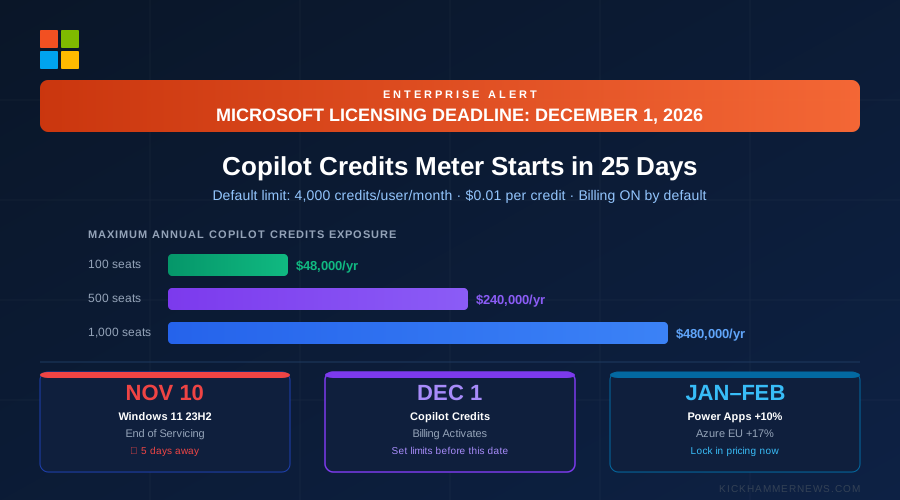
Microsoft is flipping usage-based billing to on-by-default for Microsoft 365 Copilot Business licences purchased through the Cloud Solution Provider (CSP) channel starting December 1. Advanced agent work — multi-step tasks, autonomous actions, long-running workflows — will be billed in Copilot Credits at one cent ($0.01) each.
The default limit is 4,000 credits per user per month. That ceiling is not an entitlement; it’s a cap on how much extra you can be charged. Only actual usage is billed.
The math matters. Here is what the default limit means in hard dollars across common deployment sizes:
- 100-seat deployment: 4,000 credits × $0.01 × 100 users = $4,000/month maximum overage, or $48,000/year on top of base licences
- 500-seat deployment: 4,000 credits × $0.01 × 500 users = $20,000/month maximum, or $240,000/year
- 1,000-seat deployment: 4,000 credits × $0.01 × 1,000 users = $40,000/month maximum, or $480,000/year
Microsoft 365 Copilot Business currently runs roughly $30 per user per month. At the default 4,000-credit ceiling, Copilot Credits could add up to 133% of your base licence cost. That’s not a rounding error.
The good news: admins can set the per-user monthly limit anywhere from zero to 4,000. The critical point is that this must be done before the first qualifying purchase after December 1. Microsoft’s framing is that the default is a ceiling rather than a bill, which is technically accurate — but practically speaking, leaving 4,000 credits in place is writing a blank check.
The change applies in the United States and Canada at launch. Several European and Asian markets are excluded initially.
What This Actually Means (And What Most Coverage Gets Wrong)
Most trade coverage is framing Copilot Credits as Microsoft building in cost transparency — and that’s not wrong, but it’s not the whole story. The more likely read is that this is the infrastructure layer Microsoft needed before it can aggressively price individual AI agent actions.
Today, the 4,000-credit ceiling is set high enough that most typical Copilot users won’t burn through it. That’s by design. It conditions enterprise buyers to accept metered agent pricing while the actual consumption is still modest. As Microsoft’s agent catalog expands in 2027 — and it will — the same mechanism will be in place to charge for increasingly complex, high-value tasks. Orgs that accept the default today are pre-consenting to a billing model they may not fully understand until usage scales.
The correct posture right now isn’t “ignore it because we won’t hit the limit.” It’s “set a deliberate limit that reflects what you’re willing to spend, so future agent expansions don’t create budget surprises.” Zero is a defensible default for organizations still evaluating agent value. Two hundred to 500 credits per user is a reasonable starting point for active deployments that want to allow some agent work without open-ended exposure.
The Licensing Changes You Probably Missed
Copilot for Sales and Copilot for Service are gone. These standalone products were removed from availability and licence prerequisite tables in November’s product terms update. If your renewal quotes still show these line items, push back on your reseller. Organizations already using them can continue renewing — they haven’t been terminated, only removed as new-purchase options. The replacements are bundled into Microsoft 365 Copilot.
GitHub Copilot Standalone is now live. GitHub Copilot can now be purchased as a standalone offer, independent of a broader Microsoft 365 stack. For engineering organizations that run on GitHub but haven’t adopted Microsoft 365, this opens a pathway to Copilot access without the full enterprise bundle. The pricing math here is straightforward: if your engineering team is 50 people and you’re currently licensing them through E5 to get Copilot access, standalone GitHub Copilot may be meaningfully cheaper depending on your seat structure.
Microsoft Entra’s Global Secure Access is now a named product. What was previously two separate products — Entra Internet Access and Entra Private Access — has been formally combined as Global Secure Access. If you’re managing ZTNA deployments through Entra, verify your licence references in your next renewal agreement.
Power Apps: Lock In Pricing Before January 1
Power Apps Premium increases from $20 to $22 per user per month on January 1, 2027 — a 10% increase. Organizations with 2,000 or more seats see the low-volume tier jump from $12 to $14, an increase of approximately 17%.
The practical breakeven: a 500-seat Power Apps deployment saves $1,000 per month — $12,000 per year — by signing or renewing before December 31, 2026. For the 2,000-seat tier, the difference between signing now and signing in January is $2,000 per month at 2,000 seats, $24,000 per year at that floor.
If you have Power Apps renewals coming up in Q1 2027, it is worth having your licensing partner pull the quote today. Signing a 12-month deal before December 31 locks in current rates for the full term.
Azure Regional Price Increases: Buy Reservations Before February 1
Azure is raising VM and storage prices in seven regions, effective February 1, 2027. The two most significant increases are North Europe (Dublin) up 17% and France up 11%. The other five regions are outside the US and Canada.
If your organization runs significant Azure workloads in these regions, reservations purchased before February 1 lock in today’s pricing for their full term. Savings plans do not lock rates the same way.
The simple calculation: an organization spending $100,000 per month on Azure in the North Europe region faces an extra $17,000 per month — $204,000 per year — after the increase. Even a one-year reservation signed today eliminates that exposure for twelve months. At typical reservation discounts (40–60% off pay-as-you-go for certain VM types), organizations running predictable workloads should be running this analysis now.
Decision Framework: Which Changes Require Action and When
Here is a simplified prioritization matrix for procurement and IT teams:
Act before November 30 (critical): – If your organization is purchasing any Microsoft 365 Copilot Business licences through CSP after December 1, set a per-user Copilot Credits limit now. Zero is safe. Set a positive limit only if you have a specific agent use case you want to enable. – Identify any devices running Windows 11 23H2. Those devices hit end-of-servicing November 10 — five days from now — and will stop receiving security updates. The fix is an in-place upgrade to 24H2 or later; it is not a large operation, but it needs to be on someone’s radar this week.
Act before December 31 (financial): – If your Power Apps Premium renewal falls in Q1 2027 and you have 500+ seats, evaluate locking in pre-January pricing. – If your E3 promotions are expiring and you haven’t reviewed your renewal terms, do it this month. Promotional pricing doesn’t roll over. – Review all renewal quotes for end-of-sale Copilot for Sales and Copilot for Service line items. Quotes that still show these should be corrected before signing.
Act before January 31 (Azure): – If your monthly Azure spend in North Europe or France exceeds $25,000, buying reservations before February 1 materially changes your 2027 cost structure. – If your Azure reservations in affected regions are expiring in Q1 2027, don’t auto-renew — renegotiate before February 1.
Dated Action Checklist
Copy these directly into your calendar or task tracker:
- November 10: Run a device report to identify any machines still on Windows 11 23H2 (End of Servicing). Pull this from Microsoft Intune or Endpoint Configuration Manager under Device Compliance > OS Version. Assign an upgrade owner.
- November 20: Pull Copilot Credits settings in Microsoft 365 Admin Center > Billing > Billing accounts > Usage settings. Confirm limits are set before any new CSP purchases go through after December 1.
- December 10: Audit all renewal quotes received in December for Copilot for Sales/Service line items. These should not appear as new purchases.
- December 20: Decide on Power Apps Premium renewal timing. If signing in Q1 2027 is on the roadmap, move it to December.
- December 31: Deadline for E3 promotional pricing. If you’re in the 300+ seat eligible window for the 30% promotion, the deal needs to close before this date.
- January 20: Pull Azure cost analysis report for North Europe and France regions. Identify any VM types eligible for reservations and calculate breakeven vs. February 1 pricing.
- January 31: Final deadline to buy Azure reservations at current pricing for affected regions.
The Bottom Line
November is the calm before the billing storm. Microsoft has done a reasonable job of communicating these changes through partner channels, but the gap between “this was announced” and “someone in the enterprise actually acts on it” is where budget overruns happen.
The Copilot Credits change is the most urgent because the default is “on” and December 1 is not far away. The Power Apps and Azure price changes are more predictable — you have time to model them — but only if you model them now rather than when the renewal invoice arrives.
What enterprises should take away: the era of Microsoft licensing being primarily about which products to buy has ended. The new era is about consumption management, metering policies, and renewal timing. That’s a different skillset, and the organizations that build it now will be meaningfully better positioned than those that learn it from an invoice.