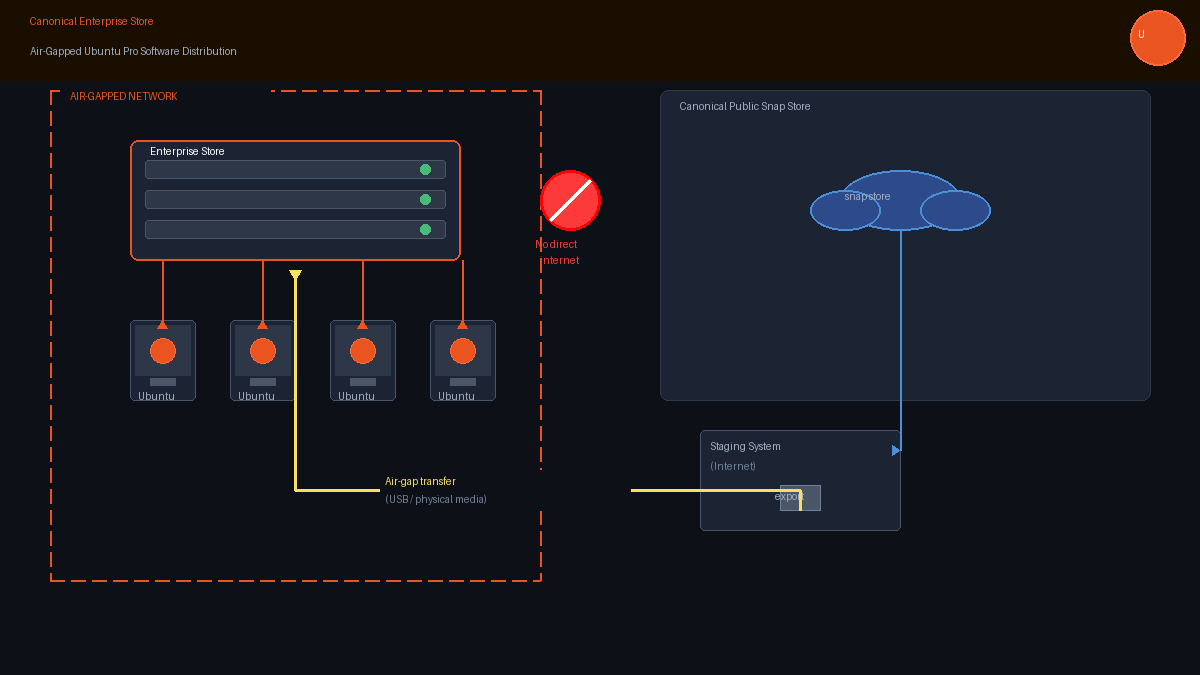
Canonical has officially launched the Enterprise Store, a new service bundled with Ubuntu Pro that lets organizations distribute, control, and update snap packages entirely within their own infrastructure — including environments that have no connection to the internet at all.
The announcement, made July 21, 2026, marks a significant step forward for enterprises that have long wanted the convenience of snap-based software management but couldn’t accept the dependency on Canonical’s public Snap Store. For government agencies, defense contractors, healthcare systems, and financial institutions operating under strict data sovereignty rules, the Enterprise Store removes one of the last practical barriers to deploying Ubuntu at scale.
What the Enterprise Store Actually Does
At its core, the Enterprise Store is a self-hosted proxy and distribution service that sits between your Ubuntu machines and the public Snap Store. Devices on your network communicate with your local Enterprise Store instance rather than reaching out to Canonical’s servers directly. The result is centralized control over exactly what software reaches which machines, and when.
The service is not entirely new. Long-time Ubuntu Pro users may recognize it under its former name: Snap Store Proxy. Canonical has now rebranded it, extended its capabilities, and made it a first-class component of the Ubuntu Pro subscription. The upgrade signals that Canonical is serious about competing for enterprise workloads that have traditionally required commercial Linux distributors like Red Hat or SUSE.
Key Features: Revision Control, Offline Mode, High Availability
The capabilities that matter most to enterprise IT teams center on three things: control, resilience, and offline operation.
Granular revision control lets administrators pin systems to specific, tested versions of any snap package. When Canonical publishes an update to a snap in the public store, it does not automatically reach your production systems — administrators must explicitly approve and push changes through the Enterprise Store. For organizations running critical infrastructure where an unplanned update could cause an outage or compliance violation, this is essential.
Air-gapped operation is the most headline-grabbing feature. In fully offline deployments, administrators export the required snaps and their metadata from an internet-connected staging system, physically transfer that bundle to the isolated network, and import it into the local store. Machines in the air-gapped environment then install and update software against the local store without ever touching the public internet. Canonical also notes that the service can distribute Juju charms and charm bundles through a local Charmhub endpoint — making it useful not just for application packages but for the orchestration tooling that enterprise Kubernetes and cloud-native deployments rely on.
High availability deployments are supported for organizations that need the software store itself to be fault-tolerant. Multiple Enterprise Store instances can be placed behind a reverse proxy, so if one node becomes unavailable, requests automatically route to another active unit. In an environment where hundreds or thousands of Ubuntu machines depend on the store for updates and deployments, that kind of redundancy is not optional — it’s a prerequisite for production use.
Who This Is Designed For
Canonical is direct about its target audience: businesses managing large Ubuntu estates, edge computing deployments, private cloud infrastructure, or any environment governed by strict security or compliance requirements.
The regulated industries angle is particularly significant. Healthcare organizations subject to HIPAA, financial firms under PCI-DSS or SOC 2 requirements, and government agencies operating classified or sensitive networks have all faced a fundamental challenge with snap-based Ubuntu tooling: the snap ecosystem assumed internet connectivity. Air-gapped mode eliminates that assumption entirely.
There’s also a subtler benefit for organizations that haven’t adopted snaps specifically because they disliked having to depend on Canonical’s public infrastructure. The Enterprise Store effectively makes snap distribution a fully internal operation, no different in principle from running your own APT mirror or RPM repository.
The service may also appeal to edge computing operators who maintain large fleets of Ubuntu-based IoT devices or industrial control systems with intermittent or no internet connectivity. Managing package distribution across thousands of endpoints without reliable outbound access has historically required significant custom tooling; the Enterprise Store offers a supported, integrated solution.
Pricing and Availability
Enterprise Store is included with Ubuntu Pro — Canonical’s extended security maintenance and enterprise support subscription. That subscription is free for up to five machines for personal use, which means home lab users and small teams can experiment with the Enterprise Store without any upfront cost. For commercial deployments, a paid Ubuntu Pro license is required for more than 25 connected clients.
That pricing model represents a meaningful competitive move. While Red Hat Enterprise Linux and SUSE Linux Enterprise both offer comparable software lifecycle and subscription management tools, they typically bundle those capabilities only in higher-tier commercial subscriptions. Canonical is making its enterprise-grade distribution controls available at the Ubuntu Pro tier, which can start considerably cheaper than comparable RHEL or SLES licensing for medium-sized deployments.
Context: Enterprise Linux Is Accelerating
The Enterprise Store launch comes at a moment when Linux’s enterprise footprint is expanding faster than at any point in the past decade. A July 2026 desktop market share report showed Windows falling below 60 percent for the first time, with Linux-based systems claiming a growing share of the remainder. In data centers and cloud infrastructure, Linux dominance has been established for years; in developer workstations and increasingly in regulated enterprise desktop environments, Ubuntu has emerged as the primary contender.
Canonical’s broader Ubuntu Pro push — which now includes live kernel patching, extended security maintenance for thousands of packages, compliance tooling, and now the Enterprise Store — is a deliberate attempt to position Ubuntu as a full commercial Linux stack, not just a free-tier community distribution. The rebranding of Snap Store Proxy to Enterprise Store is part of that narrative: this is not a hobbyist feature, it’s an enterprise product.
What the Enterprise Store Does Not Do
It’s worth being clear about scope. The Enterprise Store is not a general-purpose Linux package mirror. It does not cache APT packages, RPM repositories, or container images. Its scope is limited to Canonical’s snap and charm ecosystems. Organizations that primarily rely on traditional Debian packages will not find a replacement for tools like Aptly or an internal APT mirror here. Canonical explicitly notes that organizations using Kubernetes charms must also operate a separate local OCI registry for required container images, since the Enterprise Store does not host those.
That scope limitation is not a serious weakness — snaps and charms represent an increasingly important part of the Ubuntu software ecosystem — but enterprise architects should plan accordingly rather than assuming the Enterprise Store replaces all offline packaging needs.
The Bottom Line
The Canonical Enterprise Store is a mature, well-conceived addition to the Ubuntu Pro platform that addresses a genuine gap in enterprise Linux software management. By making it possible to run a fully self-contained, air-gapped snap distribution infrastructure — with revision control, high availability, and charm support — Canonical has removed one of the more persistent practical objections to deploying Ubuntu in regulated and sensitive environments.
For organizations that have been sitting on the fence about standardizing on Ubuntu Pro versus a traditional Red Hat or SUSE stack, the Enterprise Store provides one more reason to take a closer look. Documentation is available at Canonical’s official Enterprise Store documentation, and the full announcement can be found on Canonical’s blog.


