A new side-channel attack developed by researchers at Graz University of Technology can reveal which websites you visit and which apps you run — just by measuring your SSD’s response time through an ordinary browser API. No permissions required. No user interaction necessary. And the major browser vendors aren’t rushing to fix it.
The Cold, Hard Truth About Browser Privacy
Most people assume that when they open a browser tab, what they do in it stays in it. Different origins are isolated. Your banking tab can’t peek at your email tab. The web’s Same-Origin Policy has been one of the foundational pillars of browser security for decades.
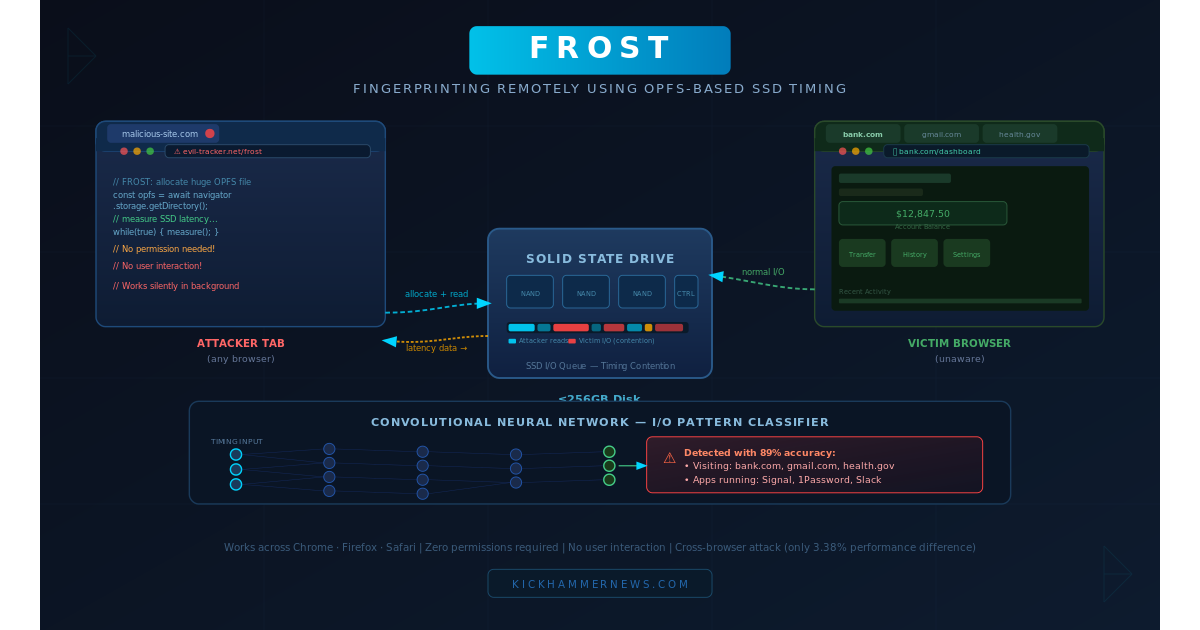
FROST — short for Fingerprinting Remotely using OPFS-based SSD Timing — quietly dismantles part of that assumption. Published by researchers at Graz University of Technology in Austria and scheduled for presentation at the DIMVA security conference in July 2026, FROST demonstrates that a malicious website can silently infer what other websites you’re browsing and what applications you have running on your machine, simply by observing how long it takes to read and write files on your solid-state drive.
The technique achieved roughly 89% accuracy identifying visited websites and 96% accuracy identifying running applications in testing on an Apple M2 Mac Mini. It works silently in the background while you do nothing more than load a page.
The Mechanism: Listening to Your Drive
To understand FROST, you need to understand two things: the Origin Private File System (OPFS) API and the concept of storage contention.
OPFS is a relatively modern browser API that allows websites to create and store files directly on a user’s local disk — without ever asking for permission. It was designed to help web applications that need fast, private local storage: think offline productivity tools, web-based games, or complex editors. Both Chrome and Safari allow a website to claim up to 60% of the user’s total disk space through OPFS. On a 256 GB SSD, that’s potentially over 150 GB of storage commandeered by a single browser tab — silently, and without a single user prompt.
FROST exploits this generosity. Here’s the attack sequence:
1. The attacker’s website uses OPFS to allocate a massive file on the victim’s SSD — large enough that it can’t fit in the system’s RAM. This forces every read from that file to physically hit the SSD rather than being served from an in-memory cache.
2. The malicious tab continuously performs random 4 KB reads across this large file and precisely measures the latency of each operation in microseconds.
3. When other activity on the machine — visiting another website, launching an app, watching a video — generates its own disk I/O, it creates measurable contention on the SSD’s internal queues. That contention shows up as latency spikes in the attacker’s reads.
4. Those timing patterns are fed into a convolutional neural network trained to recognize the unique I/O “signatures” of specific websites and applications. Different websites have distinct storage access patterns (caching resources, writing session data, loading service workers), and those patterns leak through the SSD’s timing side-channel with surprising fidelity.
The attack is cross-browser. Even when the victim is browsing in Safari and the attacker tab is running in Chrome, the storage contention happens at the hardware level, below any browser isolation boundary. Testing showed only a 3.38% throughput difference between same-browser and cross-browser attack scenarios — effectively negligible.
What Makes This Attack Uniquely Dangerous
Previous SSD-based side-channel attacks were largely theoretical threats for typical users — they required native code execution with elevated privileges, kernel module access, or physical proximity to the machine. FROST’s key innovation is that it requires none of that. It runs entirely within the JavaScript sandbox of an ordinary web browser.
A user doesn’t have to download anything. They don’t have to grant any permissions. They don’t have to interact with the malicious page in any way. Simply visiting the attacker’s website is enough to expose which other sites they’re browsing and which applications they’re running on their computer.
This shifts FROST into the category of attacks that could plausibly be deployed at scale — embedded in malicious advertisements, third-party scripts, or compromised websites. The victim needs only a browser and an SSD.
The Response from Browser Vendors: Silence and Shrugs
The Graz researchers responsibly disclosed their findings to all three major browser vendors: Google, Apple, and Mozilla.
The responses were, to put it charitably, underwhelming.
Google told the researchers that it does not classify fingerprinting as a security vulnerability. This is consistent with Chrome’s longstanding position that tracking user behavior is a monetization-adjacent gray area rather than a security concern — a stance that has frustrated privacy advocates for years.
Apple labeled the attack “currently out of scope.” Given that FROST was tested on an M2 Mac Mini and Apple’s own Safari was used in cross-browser testing, this response is particularly notable.
Mozilla acknowledged the research but implemented no fixes. Firefox users are, for now, just as exposed as those on Chrome or Safari.
The researchers have proposed several practical mitigations: capping OPFS file sizes so they remain within system memory (eliminating the need to spill onto the physical SSD), or requiring explicit user permission before a website can create large OPFS files. These changes would be straightforward to implement at the browser level. So far, none of the vendors have committed to doing so.
Limitations Worth Knowing
FROST isn’t a perfect attack, and it’s worth being clear about where it falls short.
The full fingerprinting evaluation was only performed on a single test configuration: an Apple M2 Mac Mini with 8 GB of RAM and a 256 GB SSD. The researchers confirmed they could measure SSD latency via the browser on Linux, but they didn’t run the full fingerprinting classification there. Windows was not tested at all. Multi-drive workstations may also be partially protected if the OPFS file lands on a different physical drive than the one being monitored.
The most significant practical barrier is also the most obvious: allocating 150+ gigabytes of disk space is hard to hide. Most users will notice their available storage plummeting. The researchers propose solutions to this (smaller file sizes, more sophisticated sampling), but the current proof-of-concept is more visible than a stealthy real-world attack would need to be.
That said, an attacker who targets users with large SSDs and serves the attack only briefly — long enough to build a timing fingerprint before releasing the storage — could make this far less conspicuous.
The Bigger Picture: Side-Channel Attacks Are Getting Closer to Home
FROST fits into a worrying broader trend. Side-channel attacks — techniques that extract information from physical characteristics of hardware rather than exploiting software bugs directly — have been steadily migrating from theoretical research papers toward practical browser exploits.
The notorious Spectre and Meltdown vulnerabilities demonstrated in 2018 that processor microarchitecture could leak information across security boundaries at a fundamental level. In subsequent years, researchers have demonstrated attacks exploiting CPU caches, GPU memory, network timing, display refresh rates, and now SSD I/O queues — all through browser-accessible JavaScript APIs.
Each new side-channel attack erodes a little more of the assumption that browser isolation is hermetic. FROST is notable not because it’s the most dangerous of these techniques, but because it’s so accessible: it requires no hardware, no special access, no user action. Just a webpage and a timer.
What Can You Do Right Now?
Until browser vendors act — and given their responses, that may be a long wait — ordinary users have limited options. A few practical steps:
Use a browser extension like uBlock Origin or NoScript to block untrusted third-party scripts, which reduces the attack surface for malicious code embedded in ads or widgets.
Monitor your disk usage. If a website is suddenly consuming enormous amounts of storage, that’s a red flag. Browser developer tools can show you OPFS storage under the Application > Storage panel.
Consider browsers with stronger anti-fingerprinting stances, such as the Tor Browser or Brave, which apply more aggressive countermeasures to timing-based attacks by adding deliberate noise to high-resolution timers.
Keep an eye on browser update notes for any mention of OPFS restrictions — the research community’s public disclosure of FROST may eventually pressure vendors to act, even if internal disclosure did not.
Conclusion
FROST is a reminder that browser security is not simply a matter of software bugs. The hardware your computer runs on — in this case, the SSD that stores your files — is part of the attack surface, and the APIs that browsers expose to JavaScript are the attack vector. A feature designed to help productivity apps store offline data has been turned into a sensor that can watch what you do across your entire machine.
The researchers have done their job: discovered the vulnerability, characterized it, proposed mitigations, and disclosed it responsibly. The harder question is whether the browser vendors will eventually take privacy side-channels seriously enough to act — or whether users will remain quietly exposed while the industry decides fingerprinting isn’t a security problem worth fixing.