After years of incremental tweaks and user complaints, Mozilla has finally delivered on the promise it made back in 2025: a ground-up visual and functional reinvention of Firefox. Firefox 157, codenamed “Nova,” launched on September 29, 2026, and it may be the most significant browser update Mozilla has shipped since the contentious “Proton” redesign of 2021. This time, though, the reception has been dramatically different.
From Proton to Nova: Why Firefox Needed a Fresh Start
When Mozilla introduced the Proton interface five years ago, the response was mixed at best. Users complained about wasted space, the removal of compact mode, clunky tab designs, and an overall visual language that felt neither modern nor distinctly Firefox. The browser gradually lost market share to Chrome and increasingly capable competitors like Arc and Vivaldi. Now, with Nova, Mozilla appears to have listened — deeply.
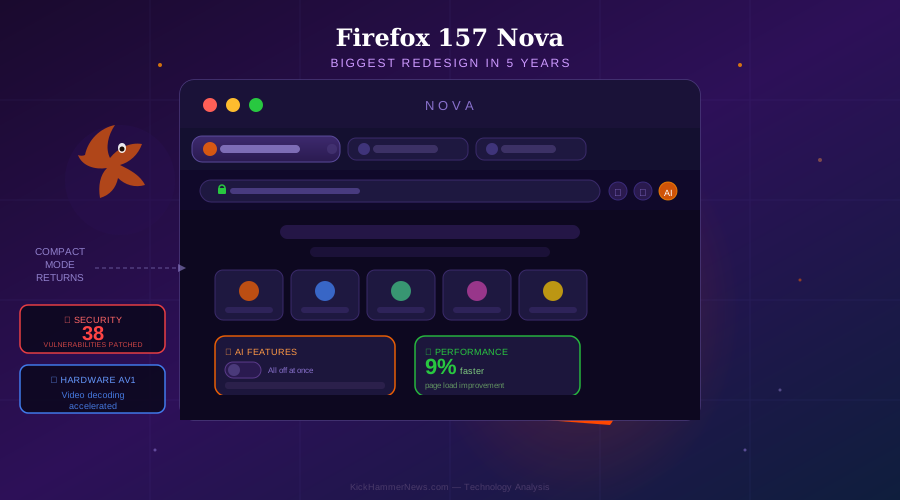
The new design replaces nearly every visible element of the Proton interface. Tabs have been rounded and softened with subtle gradients. Icons are cleaner and more balanced across light and dark themes. The color palette has been refreshed with what Mozilla describes as being “inspired by the feeling of fire” — fitting for a browser that has always used fire as its symbol. The overall aesthetic goal: “contemporary, but not generic — friendlier, but still precise.” It’s a fine line to walk, and based on early user feedback, Mozilla has largely succeeded.
Compact Mode Is Back — and the Community Is Celebrating
If there is one feature that dominated Firefox forum threads for the last four years, it was Compact Mode. Users of smaller laptops and high-resolution displays have long demanded the return of the density-reducing interface option that shrinks tabs and toolbars to maximize screen real estate. Mozilla removed it without a clean replacement in Proton, and the outcry never fully subsided.
Nova brings it back — and improves it. Firefox will now automatically suggest Compact Mode to users on smaller screens, recognizing display sizes at setup. The feature is also accessible through the standard toolbar customization menu, and it integrates cleanly with the new Nova visual language rather than feeling like a legacy add-on. This alone has driven significant positive buzz across developer and power-user communities.
Privacy Gets a New Face
One of the more interesting design decisions in Nova is how Mozilla has repositioned its privacy features. Rather than burying VPN access and tracker controls deep in settings menus, the redesign pulls them to the foreground — visibly accessible from the browser toolbar with “plainer language throughout.”
Perhaps most notable is a single unified toggle to disable all generative AI features at once. As browsers have increasingly integrated AI-powered summarizers, smart autocomplete, and content recommendation systems, the privacy implications have grown more complex. Firefox Nova addresses this directly: one switch, full AI off. For privacy-conscious users who previously had to hunt through individual setting toggles to disable separate AI functions, this is a meaningful quality-of-life improvement.
Mozilla has also restructured the Settings interface itself, using clearer language and logical groupings that make it far easier to understand what each option actually does. It’s an acknowledgment that the browser has accumulated years of complexity that most users never navigate effectively.
Speed: 9% Faster Page Loads and Hardware-Accelerated Video
Performance has always been a battleground for browsers, and Firefox 157 arrives with real numbers to tout. Mozilla reports a 9% improvement in load times for key page content over the past year — gains achieved in part by making tracker blocking more efficient. Counterintuitively, the same privacy filters that block advertising scripts and third-party trackers are now contributing to faster page rendering rather than slowing it down.
On the media side, Firefox 157 introduces hardware-accelerated AV1 video decoding. AV1 has become the codec of choice for high-efficiency streaming, used by YouTube, Netflix, and most major video platforms. Moving decoding to hardware reduces CPU load significantly, which translates to smoother playback and longer battery life on laptops. The update also fixes longstanding HDR video display issues on Windows and improves audio-video sync during playback speed changes — issues that may sound minor but have been persistent annoyances for years.
Security: 38 Vulnerabilities Patched, Including Critical Sandbox Escapes
Firefox 157 is also one of the most significant security releases in recent memory. Mozilla patched 38 high-risk vulnerabilities, including sandbox escapes and privilege escalation opportunities in WebGPU and graphics components. These are exactly the kinds of vulnerabilities that, if exploited, could allow malicious websites to break out of browser isolation and access the underlying operating system.
The timing is notable. With browsers increasingly used as the primary interface for enterprise workflows, cloud applications, and AI-powered tools, the attack surface has expanded considerably. Mozilla’s aggressive patching cadence — and its willingness to discuss these vulnerabilities publicly — stands in contrast to some competitors that have been criticized for slower disclosure timelines.
A Consistent Experience Across Devices
One of the more thoughtful aspects of Nova is its commitment to cross-platform consistency. Mozilla has extended the new design language to Firefox for Android and iOS, sharing colors, icons, copy, and foundational design elements across desktop and mobile. For users who switch between devices throughout the day, this creates a coherent and recognizable experience that many browsers — including Chrome — still struggle to maintain across form factors.
Vertical tabs, split view, and tab groups — features that have been available in Firefox for some time — also receive improved accessibility in Nova. These productivity-oriented features are now more prominently surfaced and easier to activate without digging through menus, a change that should help with adoption among power users who weren’t aware they existed.
The Broader Context: Can Firefox Claw Back Market Share?
Firefox’s market share has been in long-term decline for over a decade, currently sitting somewhere between 3–5% depending on the measurement. The browser market is dominated by Chromium-based engines, and alternatives like Safari capture a large segment of Apple device users. Nova will not reverse this trend overnight.
But Mozilla’s bet with this redesign appears to be on differentiation rather than imitation. Rather than building a Chrome clone with a different logo, Nova leans into what makes Firefox distinct: its genuine commitment to privacy, its open-source DNA, its customizability, and its independence from the ad-tech ecosystem. The single AI-off toggle is a statement as much as a feature. The return of Compact Mode is an acknowledgment that Firefox’s most devoted users matter.
If Nova is the browser Mozilla’s community has been waiting for, and if the performance and security improvements hold up under real-world use, Firefox 157 may quietly become the best browser in the market for users who care about more than just the default.
The update is available now through Firefox’s built-in updater, and fresh downloads are available at mozilla.org.