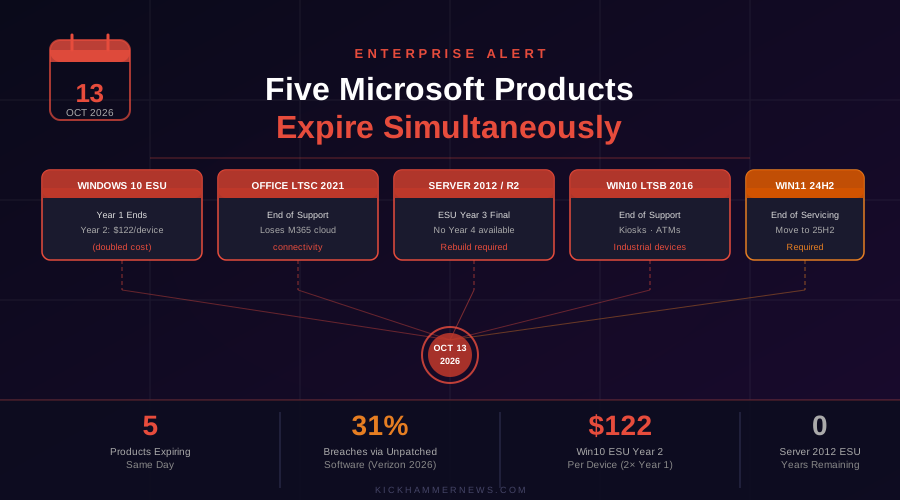
October 12, 2026 — Tomorrow is not just another Patch Tuesday. When calendars flip to October 13, 2026, enterprise IT teams across the globe will wake up to something genuinely unprecedented in Microsoft’s product lifecycle calendar: five significant end-of-support events expiring simultaneously. Windows 10’s commercial ESU window, Office LTSC 2021, Windows Server 2012, an aging Long-Term Servicing Branch, and even a slice of Windows 11 itself — all hit their end-of-the-road on the same date. For organizations that have been procrastinating on modernization, the reckoning has arrived.
Five Deadlines, One Date
The sheer breadth of what expires tomorrow is staggering. Here is what IT departments need to grapple with:
Windows 10 Commercial ESU Year 1 Ends. Microsoft launched its Extended Security Updates program last October when mainstream Windows 10 support concluded. That first year of patching, priced at $61 per device, expires on October 13. Enterprises that want to stay protected while they complete their migration to Windows 11 must now enroll in Year 2 — at $122 per device, exactly double the Year 1 price. The compounding cost structure is deliberate: Microsoft wants organizations moving forward, not lingering indefinitely on legacy hardware. The only relief comes for Windows 10 virtual machines running in Windows 365 or Azure Virtual Desktop, which receive ESU coverage at no additional charge for up to three years.
Office LTSC 2021 and Office 2021 Lose Support — And More. The Office LTSC 2021 product line, which includes the perpetual-license versions popular with regulated industries, government agencies, and organizations with air-gapped environments, goes out of support on October 13. This is painful on two levels. First, the applications will no longer receive security patches, leaving them vulnerable to document-based exploits and zero-days. Second, and perhaps more critically, Office LTSC 2021 will no longer be a supported version for connecting to Microsoft 365 cloud services. Microsoft has warned that connecting to Exchange Online, SharePoint Online, and other cloud backends after this date is “not supported” and may result in performance or reliability degradation. Organizations that expected their perpetual license to quietly chug along against cloud backends indefinitely are about to discover that was never the plan.
Windows Server 2012 and 2012 R2 Hit the Final ESU Curtain. Microsoft launched its Windows Server 2012 ESU program in October 2023. The program offered a maximum of three years. Tomorrow, Year 3 ends — permanently. There is no Year 4 for Windows Server 2012. Any workload still running on these platforms, whether on-premises or in Azure (where Microsoft provided the ESU coverage automatically), will receive no further security patches from Microsoft. The recommended path is to rebuild those workloads on a supported Windows Server version, but that advice is considerably easier stated than executed for organizations running decades-old line-of-business applications tightly coupled to aging server infrastructure.
Windows 10 LTSB 2016 and IoT Enterprise LTSB 2016 Expire. The Long-Term Servicing Branch editions of Windows 10, designed for kiosks, industrial systems, and specialty devices that cannot tolerate feature updates, are also expiring this month. Windows 10 2016 LTSB and Windows 10 IoT Enterprise LTSB 2016 reach full end of support on October 13. Operators of ATMs, point-of-sale systems, manufacturing floor terminals, medical devices, and embedded retail kiosks need to audit their device inventories urgently. These systems tend to be the most difficult to update precisely because they are embedded in hardware or certified environments where OS changes require regulatory re-certification.
Windows 11 Version 24H2 Reaches End of Servicing. Even Windows 11 is not immune. The 24H2 feature update, which shipped to consumers in late 2024, reaches end of servicing on October 13. Devices running this build will stop receiving cumulative updates from Microsoft. IT administrators managing Windows 11 fleets need to ensure devices are enrolled in Windows Update for Business and are being moved to version 25H2 or later.
The Security Math Is Unforgiving
The timing of this mass expiration is not merely an administrative headache — it is a genuine security inflection point. According to Verizon’s 2026 Data Breach Investigations Report, 31 percent of breaches last year involved exploitation of software vulnerabilities. Unpatched operating systems and applications are among the most reliably exploited attack surfaces in any threat actor’s toolkit. The moment security updates stop flowing, the clock starts ticking for attackers who are well aware of which CVEs remain unpatched on legacy systems.
The Office LTSC 2021 situation is particularly concerning for phishing and document-based attack vectors. Malicious Office documents remain one of the most common malware delivery mechanisms, and a version of Office no longer receiving security updates is a prime target. Organizations in heavily regulated sectors — finance, healthcare, government contracting — face compounding risk: not only the security exposure itself, but potential compliance violations if examiners find unpatched, end-of-life software in production environments. The FFIEC IT Examination Handbook explicitly requires institutions to track end-of-life assets and document dated replacement plans.
What IT Teams Should Do Right Now
For enterprises still running any of the affected products, the immediate priorities are clear. Conduct a full inventory of affected systems before Tuesday morning. Prioritize Windows Server 2012 and 2012 R2 workloads — these represent the highest security risk given there is no further ESU path. Evaluate whether Windows 10 Year 2 ESU is the right bridge while completing migration, understanding that the price has now doubled.
For Office LTSC 2021 users, the decision point is whether to migrate to Microsoft 365 Apps subscriptions or upgrade to the newly released Office LTSC 2024, which carries connectivity support through October 2029. Organizations that need Copilot functionality should note that Office LTSC 2021 is explicitly excluded from Microsoft 365 Copilot support requirements — another nudge toward the subscription model.
Microsoft 365 Apps running on Windows 10 will continue to receive security updates through October 10, 2028, but those apps will be locked at Version 2608 and will lose access to future features and Copilot enhancements. That may be acceptable as a temporary measure for organizations with large Windows 10 hardware fleets that cannot yet meet Windows 11’s TPM 2.0 and secure boot requirements.
The Bigger Picture: An Era Closing
The October 13, 2026 convergence marks something larger than a routine maintenance deadline. It represents the closing of an entire generation of Microsoft enterprise software — the Windows 10 and Server 2012 era, products that saw organizations through the cloud transition, the remote work explosion of the early 2020s, and the emergence of AI-augmented productivity. That generation is now formally retired.
The enterprises that will weather this transition smoothest are those that treated it as a migration project rather than a deadline crisis. For everyone else, the time to act was months ago. The second-best time is now.


